4.10.1 Adding command

Location
Parameters

This procedure shows how to add a scheduler command for one projector.

Tip: To add a scheduler command for multiple projectors, see “Scheduler”.
How to add
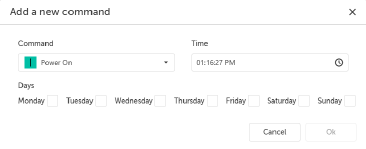
  1. Click Add command button.

    The Add a new command window will be prompted.

    Image 4–28
  2. Select a command:

    • Power On from the Command drop-down menu.
    • Power Off from the Command drop-down menu.
  3. Enter the time.
  4. Select the desired day by checking the box in front of it.
  5. Click Ok.
  6. Click Send.

    The Send window will be prompted.

    Image 4–29
  7. Click Ok.

    The commands are added to the weekly overview.