2.4 Restoring suppressed notifications

About suppressed/restored notifications

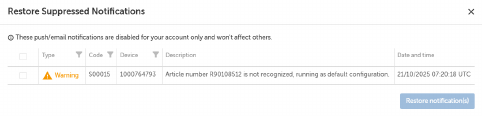
The Suppressed notifications shows the push/email notifications that are currently disabled. These settings apply only to the active account and do not affect other users.

Location
How to restore
  1. Click the user icon at right side of the IMS main header.

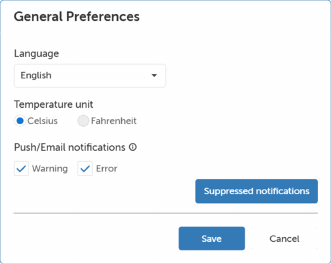
  2. Select Preferences.

  3. Click Suppressed notifications.

    The Restore Suppressed Notifications window will be prompted.

    Image 2–5
  4. Select the desired notifications by checking the boxes in front of each notification.
  5. Click Restore notification(s).

    Tip: To suppress a notification, open the email received for a warning or error alert. Use the link provided to disable future notifications of the same type, either for the specific projector or for the entire product line.