5.3.2 Adding command to group

About

This procedure shows how to add commands for a group of devices.

Location

IMS main sidebar > Group view > Add command

How to add
  1. Select the group by clicking on the group name from the Projector groups sidebar.
  2. Click Add command.

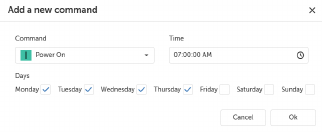
    The Add a new command window will be prompted.

    Image 5–9
  3. Select the command from the drop-down menu:

    • Power On
    • Power Off
  4. Select the time and days.
  5. Click Ok.
  6. Set the offset time in seconds in the input field Offset power on by to prevent power spikes.
  7. Click Send.

    The updated schedule will be sent to the devices.