The unit must always be mounted in a manner which ensures both air inlets and outlets are free. For installations in environments where the device is subject to excessive dust, it is highly advisable to take measures to prevent the dust from reaching the unit. If this is not a feasible, then the unit should be relocated to a different dust-free location.
It is the customer's responsibility to ensure at all times that the device is protected from the harmful effects of hostile airborne particles in the environment of the device. The manufacturer reserves the right to refuse repair if a device has been subject to negligence, abandon or improper use.
The table below summarizes the physical environment in which the PDS-4K presentation switcher may be safely operated or stored.
Environment
Operating
Non-Operating
Ambient Temperature
0°C (32°F) to 40°C (104°F)
-10°C (14°F) to 60°C (140°F)
Air cleanliness
Clean office environment (equivalent with cleanroom standard ISO 14644-1 ISO Class 9)
The PDS-4K chassis is designed to be rack mounted and is supplied with front rack-mount hardware.
Note: The PDS-4K chassis can also be used in a “tabletop” configuration, without rack mounting.
When rack mounting the PDS-4K chassis, remember the following important points:
The PDS-4K chassis is 1.5 RU in height.
The maximum ambient operating temperature is 40°C (104°F).
Leave at least one inch of space (front and rear) to ensure that the airflow through the fan and vent holes is not restricted.
When installing multiple units into a rack, distribute them evenly to prevent hazardous conditions that may be created by uneven weight distribution.
Connect the unit only to a properly rated supply circuit.
Reliable grounding (earthing) of rack-mounted equipment should be maintained.
Rack mount the unit from the front rack ears, using four rack screws (not supplied). Threads may be metric or otherwise, depending upon the rack type.
PDS-4K units are shipped with side rails included in the shipping case and not installed onto the chassis. These side rails, when they are properly installed and adjusted, assist with the distribution of chassis (and cable) weight within your rack. Use the following steps to properly adjust the side rails:
Measure and install the two supplied mounting brackets on your rear rack rails.
Image 2–2Mounting bracket
Measure the distance between the front and rear rack rails. Remove the mounting screws that secure each side rail to the chassis, and then adjust the spacing of each side rail as necessary. The PDS-4K uses two mounting screws on each side rail.
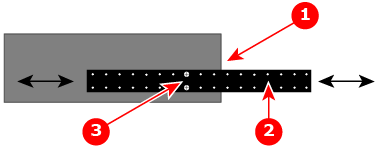
Image 2–3PDS-4K chassis with side rail and mounting screws
1
Chassis rear
2
Side rail
3
Mounting screws
Re-install the mounting screws. When properly adjusted, the end of each side rail will protrude through the slot in the rear mounting bracket, once the chassis is rack mounted.
Lift the chassis and, while supporting it, slide the side rails through the slots in the rear mounting brackets.
While continuing to support the chassis, install and tighten the two lower screws.
Finally, install and tighten the two upper screws in the rack rail.
Site preparation
The environment in which you install your PDS-4K presentation switcher should be clean, properly lit, free from static, and have adequate power, ventilation, and space for all components.
Do not install the device in a site near heat sources such as radiators or air ducts, or in a place subject to direct sunlight, excessive dust or humidity. Be aware that room heat rises to the ceiling; check that temperature near the installation site is not excessive.
Cable and adapter information
The table below provides information regarding cables used with the PDS-4K.. When connecting to a PDS-4K, use high-quality shielded cables.
Cable
Description
Notes
RJ-45 Ethernet cable
For use with external controllers or Web Interface and EMTS GUI
For remote connections; customer supplied
AC power cord
AC Power, 7 foot, 10A
For power connection; 1 cord supplied
Power cord and line voltage selection
The PDS-4K is rated to operate with the following specifications:
Input Power: 100-240 VAC, 50-60 Hz
Power Consumption: 1.8A maximum
The PDS-4K performs line voltage selection automatically. No user controls are required. The AC power cords must be accessible so that they can be removed during field servicing.
Warning: Only use the power cords supplied by Barco, or use power cords that match the voltage of the power outlet and have been approved by and comply with the safety standards of the country.
Disconnect the power cord to remove all power to the PDS-4K.
[3] For PRC (People's Republic of China) the certified altitude is specified on the product label.