Button location
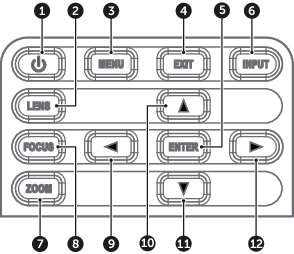
- 1
- POWER
- 2
- LENS
- 3
- MENU
- 4
- EXIT
- 5
- ENTER
- 6
- INPUT
- 7
- ZOOM
- 8
- FOCUS
- 9
- LEFT
- 10
- UP
- 11
- DOWN
- 12
- RIGHT

| Button | Function |
| POWER | Turn the projector on or off. |
| LENS | Adjust lens position. |
| MENU | Show the main menu on screen. |
| EXIT | Return to previous menu or exit menu if at top level. |
| ENTER | Confirm the settings. |
| INPUT | Select an input source. |
| ZOOM | Adjust the image size. |
| FOCUS | Adjust the image focus. |
| LEFT | Navigate left through the menu. |
| UP | Navigate up through the menu. |
| DOWN | Navigate down through the menu. |
| RIGHT | Navigate right through the menu. |