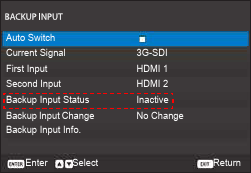
The “Backup Input” function allows the user to set up two input sources with the same timing specification.
Upon connection loss of one input source, the projector automatically switches to the backup source.
This function can be useful for the installations requiring uninterrupted displaying of the content source, such as live show, exhibition, and critical control room.
Auto switch
Check the box to enable automatic switching to the backup input source when the active source fails.
Current signal
Displays the currently active signal.
First input
Select a signal as the first input source.
Once the selected source is activated, the OSD menu lists out the signals Resolution, Horz Refresh rate (horizontal refresh rate), and Color Space.
Second input
Select a signal as the second input source.
Once the selected source is activated, the OSD menu lists out the signal’s Resolution, Horz Refresh rate (horizontal refresh rate), and Color Space.
Backup input status
Displays the status of the backup input function.
The backup input status will show as active, when meeting the following conditions:
Auto switch is on.
The two sources have the same timing specification.
The two sources are active.
Projector is displaying one of the two sources.
Image 7–1
Backup input change
Displays the Backup input change.
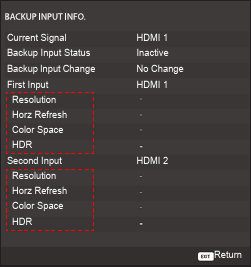
Backup input info
Displays the Backup input info information:
Current signal
Backup input status
Backup input change
Info about the first input:
Resolution
Horz refresh rate (horizontal refresh rate)
Color space
HDR
Info about the second input:
Resolution
Horz refresh rate (horizontal refresh rate)
Color space
HDR
Note: 3G-SDI does not support the backup input function!
Note: To activate the backup input function all input options must be the same for the two inputs!Image 7–2