Overview
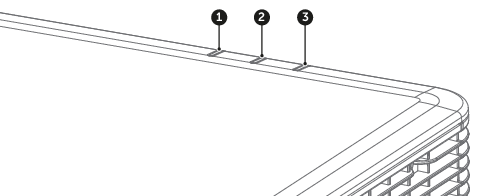
- 1
- AV Mute LED
- 2
- Status LED
- 3
- Light LED

| Message | Light LED | Status LED | AV Mute LED | |||||
| Green | Orange | Red | Green | Orange | Red | Green | Orange | |
| Standby State | ||||||||
Power on (warm up) | Flashing | |||||||
| Power on & Laser diode on | Steady | Steady | Steady | |||||
| Power off (cooling down) | Flashing | |||||||
AV mute is off (image is displayed) | Steady | Steady | Steady | |||||
AV mute is on (image is black) | Steady | Steady | ||||||
| Projector communication | Steady | Flashing | Steady | |||||
| Firmware upgrade | Flashing | Flashing | ||||||
| Burn-in | Flashing | Flashing | ||||||
| Factory reset | Steady | Steady | ||||||
Error (over temperature) | Steady | |||||||
Error (fan failure) | Flashing | |||||||
| Error (color wheel failure) | Flashing | |||||||
