About settings
Configure advanced color settings to improve the color performance.

Configure advanced color settings to improve the color performance.
Change the color of a projected image by adjusting each color component in the image. The adjustable color includes Red, Green, Blue, Cyan, Yellow, and Magenta (R/G/B/C/Y/M).
Auto Test Pattern:
Enable the function to view a specific color pattern while adjusting.
R/G/B/C/M/Y:
Select a color for further adjustment.
Hue:
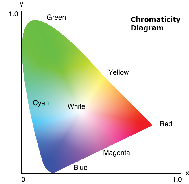
Adjust the hue of the selected color. The value reflect the number of degrees of rotation around the chromaticity diagram from the original color. Increasing value indicates counterclockwise rotation, and decreasing value, clockwise rotation.
Saturation:
Adjust the saturation of the selected color. The value indicates the color shifts from or towards the white in the center of the chromaticity diagram.
Gain:
Adjust the gain of the selected color. Increase the value to brighten the image (add white to a color) or decrease the value to darken the image (add black to a color).
Reset:
Reset the function settings to factory default values.
Configure the settings for the High Dynamic Range (HDR) function.
HDR
Off:
Turns off the projector’s HDR function, and the projector announces that it does not support HDR content so that the input device only sends out SDR signals.
Auto:
When receiving HDR signals, the projector automatically changes to HDR display mode.
HDR picture mode
Bright:
Increase the color saturation for bright images.
Standard:
Make the images look more realistic and natural.
Film:
Improve the image details for videos.
Detail:
Improve the image details in dark scenes.
Configure the settings for maximizing the contrast for dark content.

Dynamic black:
Enable the dynamic contrast to automatically adjust the contrast ratio for video sources, it improves the black level in dark scenes by reducing the light output.
Speed:
Adjust the speed of the light source correction. The value ranges from 1 to 15. A lower value makes the correction slower and less aggressive while a higher value results in the faster correction.
Strength:
Set the strength of the dynamic contrast adjustment. The value ranges from 0 to 3, the higher the value the stronger the correction.
Level:
Adjust the light source when the brightness level of the current content gets lower than the set value. The value ranges from 50% to 100%. The higher the value, the larger the range to adjust the light source.
Extreme black:
Enable the dynamic contrast to automatically increase the contrast ratio by turning off the laser light when black image is detected.
Light out timer:
Set a timer for the laser light to turn off after detecting black content. The set value ranges from 0s to 20s.
Light out signal level:
Set a black level value as the threshold for the “Real Black” function. The value can be selected from 0 to 255, with 0 being the darkest black and 255 being the brightest.
Light on offset:
Set a tolerance value as the threshold for keeping extreme black. When the threshold is exceed, the brightness will change from extreme black to normal.
Reset:
Reset the dynamic contrast settings to their factory default values.