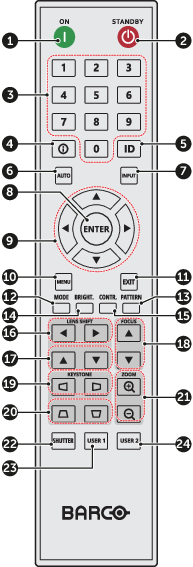
 | 1 | ON | Turn the projector on. |
| 2 | Standby | Turn the projector off. |
| 3 | Number | Input numbers (0-9) |
| 4 | Info | Display information on the source image. |
| 5 | ID | Set the projector address. |
| 6 | Auto | Automatically synchronize the projector to an input source. |
| 7 | Input | Select an input source manually. |
| 8 | Enter | Confirm an selection. |
| 9 | Arrow keys | Use arrow keys to navigate through the menu or select the appropriate settings. |
| 10 | Menu | Show the main menu on the screen. |
| 11 | Exit | Back to previous menu. |
| 12 | Mode | Press to select the preset display mode. |
| 13 | Pattern | Displays test patterns |
| 14 | Brightness | Set the brightness of the image. |
| 15 | Contrast | Set the contrast of the image. |
| 16 | Lens shift H | Adjust the image position horizontally. |
| 17 | Lens shift V | Adjust the image position vertically. |
| 18 | Focus | Adjust the image focus. |
| 19 | Keystone H | Adjust a horizontally keystone image. |
| 20 | Keystone V | Adjust a vertically keystone image. |
| 21 | Zoom | Adjust the image size. |
| 22 | Shutter | Momentarily turn off/on the screen (AV Mute). |
| 23 | User1 | Press to assign custom functions. See user guide for more info. |
| 24 | User2 | Press to assign custom functions. See user guide for more info. |
