About geometry correction
Configure the geometry settings to reshape the image for different projection surface.

Configure the geometry settings to reshape the image for different projection surface.
Configure warp settings.
Basic:
Configure basic settings, such as keystone, pincushion, and 4-corner.
Advanced:
Configure advanced settings, such as grid points, warp inner, warp sharpness, and more.
Configure basic warp settings.
Keystone:
The keystone functionality is used to adjust the images in asymmetric rectangle shape.
Horizontal:
Adjust the left and right side of the projected image to make it an even rectangle, used for images with unequal left and right sides.
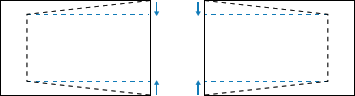
Vertical:
Adjust the top and bottom side of the projected image to make it an even rectangle, used for images with unequal top and bottom sides.
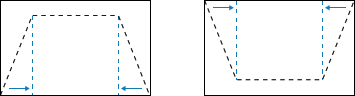
Pincushion:
Pincushion function is used to adjust the image with barrel or pincushion distortion.
Horizontal:
Correct the projected image with horizontal barrel or pincushion distortion.
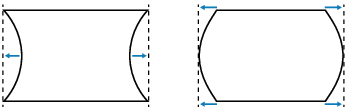
Vertical:
Correct the projected image with vertical barrel or pincushion distortion.
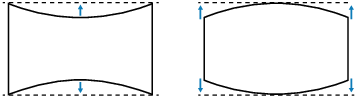
4-corner:
Reshape the image by moving the 4 corners of the image to have it fit a specific projection surface.
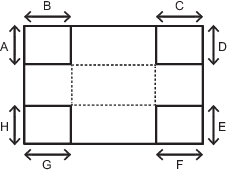
Configure advanced warp settings.
Grid Points:
Set the grid points of warp pattern.
Warp Inner:
Enable or disable warp inner control.

Warp Sharpness:
When the grid lines are warped from straight into curve, the grid lines will be distorted and become jagged. To avoid the line jagged are too obvious, users can adjust the warp sharpness to blur or sharpen the edge of the images.
Grid Color:
Select a grid color for warp and blend pattern.
Grid Background:
Select the grid background.
Blend Setting:
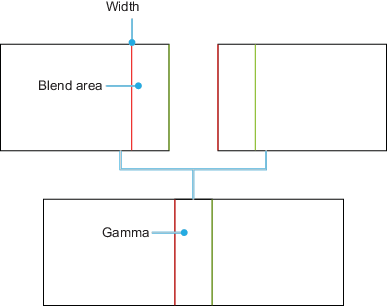
Configure the blend settings directly on the projector to merge two or more adjacent images into one larger and seamless image.
Blend Width:
Set the blend pattern width.
Overlap Grid Number:
Set the blend overlap grid number.
Gamma:
Set the gamma value of the blend area to adjust the curvature of the blending effect.
Reset the geometry settings to their factory default values.
Select a record from 1 to 5 to save the current geometric correction settings.
Select a record from 1 to 5 to apply the geometric correction settings.
Clear the saved geometric correction records.