
How to restore a backup.
- Power on the projector.
- Connect your computer to the projector, using a LAN cable.
Browse to the IP address of the projector via a browser of choice.

The login screen will be displayed.

Image 3–30 Example of the login page Log in as Admin.
Navigate to the “Service” tab under “SYSTEM”. (reference 1)
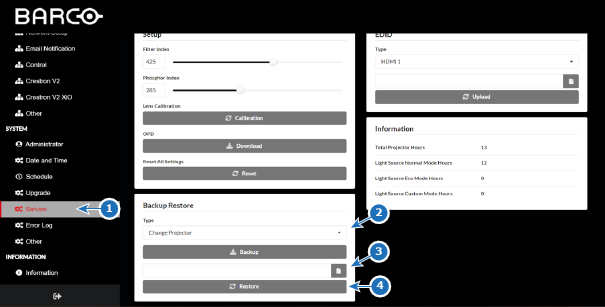
Image 3–31 Example of the Backup Restore page Select the type, that was used to create the backup, in the “Type” drop-down menu of the “Backup Restore” category (reference 2).

- Click on the upload file icon (reference 3) and navigate to the desired backup file via the pop-up.
Click on the “Restore” button (reference 4) to import the backup.