
How to install
For type 2 lens shift module (G60 + LSM type 2, G62 + LSM type 2), you need to install an UST lens pogo pin adapter in order to attach the UST lens to the projector.
Loosen the three screws on the UST lens pogo pin adapter with a Philips #2 screwdriver.
The middle screw controls the lateral position of the circuit board on the adapter:
- Turning the screw counter-clockwise moves the circuit board towards the screw.
- Turning the screw clockwise moves the circuit board away from the screw.
To have the pogo pin adapter properly installed to the projector, turn this middle screw counter-clockwise for at least 3 turns before the installation.
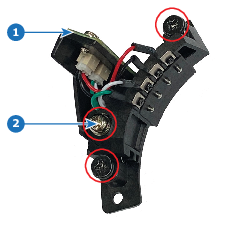
Image 7–16 - 1
- Circuit board
- 2
- Middle screw
Insert the UST lens pogo pin adapter to the projector.

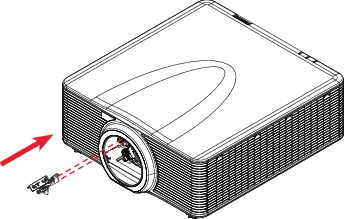
Image 7–17 Tighten the side screws on the pogo pin adapter.
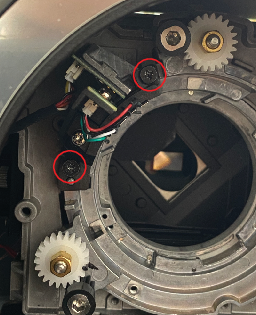
Image 7–18 Tighten the middle screw on the pogo pin adapter.
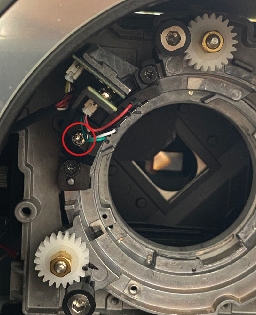
Image 7–19