Prerequisites
All Ultra Short Throw (UST) G lenses require a lens support. The lens support must be (partially) installed before installing the projection lens. For more information, see “G lens (0.37 - 0.4 : 1) UST 90°”.


All Ultra Short Throw (UST) G lenses require a lens support. The lens support must be (partially) installed before installing the projection lens. For more information, see “G lens (0.37 - 0.4 : 1) UST 90°”.
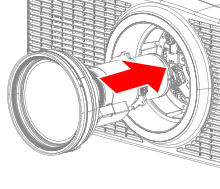
Gently insert the lens all the way in the lens holder.
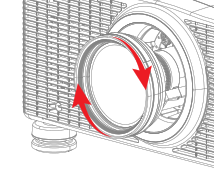
Rotate the lens clockwise to lock the lens.
Is the projector installed above the head of people? (not applicable for UST lenses)