3.6 Connecting the projector with the power net

Caution: Use only the power cord supplied with your device. When no power cord for your region/country is provided, contact your dealer. The power cord must be suited for the electrical ratings indicated on the product ID label. Only power cords according to the local electrical code regulations can be used.
How to connect with local power net
  1. Ensure that the power switch stands in the '0' (OFF) position (reference 1)
  2. Connect the female side of the power cord with the power input socket of the projector (reference 2)
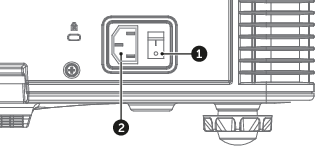
    Image 3–22
  3. Connect the male side of the power cord to the local power net.

    Caution: Ensure that the power net meets the power requirements of the projector.
Warning: Do not attempt operation if the AC supply and cord are not within the specified voltage and power range.