About advanced color
Configure advanced color settings to improve the color performance.

Configure advanced color settings to improve the color performance.
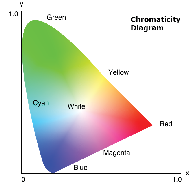
Change the color of a projected image by adjusting each color component in the image. The adjustable color includes Red, Green, Blue, Cyan, Yellow, and Magenta (R / G / B / C / Y / M).
Configure the settings for the High Dynamic Range (HDR) function.
HDR
HDR Picture Mode
Set up the Dynamic Contrast to maximizing the contrast for dark content.
Dynamic Black: Enable the function to automatically adjust the contrast ratio for video sources. It improves the black level in dark scenes by reducing the light output.
Extreme Black: Enable the function to automatically increase the contrast ratio by turning off the laser light when black image is detected.