5.2 Power off the projector

How to power off the projector
  1. Press the Standby button (reference 2) on the remote control or the Power On/Off button (reference 3) on the control panel.
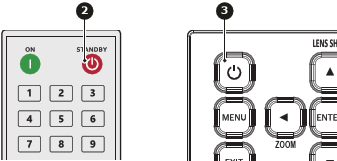
    Image 5–4

    A confirmation request will be prompted on the screen.

  2. Press the same button again to confirm.

    Note: If not confirmed after five seconds, the confirmation request will disappear and the projector will remain on.
Caution: Don’t power on the projector again immediately after entering standby mode.
Caution: Don’t switch off or disconnect the projector from the power net until the cooling down cycle is completed.