5.3.6 Connecting over LAN

About LAN connection

Connecting the CB Core, CB Pro to the LAN, allows for the configuration and management of the Base Unit remotely.

How to connect
  1. Remove the cable cover at the back of the Base Unit.
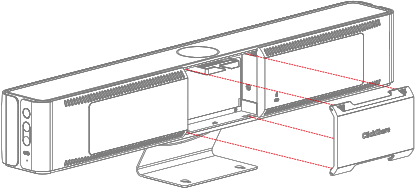
    Image 5–23 Cable cover removal
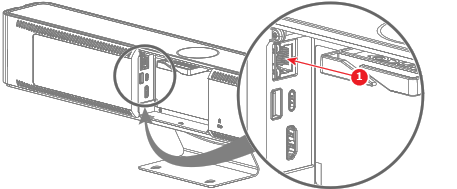
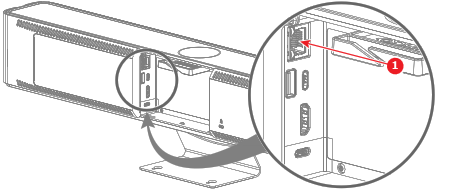
  2. Connect an ‘ethernet’ cable to the ‘ethernet’ port at the back of the Base Unit. (reference 1)

    • For CB Core:

      Image 5–24 Where to connect the LAN cable
      1
      LAN cable
    • For CB Pro:

      Image 5–25 Where to connect the LAN cable
      1
      LAN cable
  3. Route the cable(s) through the cable binder. (optional)
  4. Connect the other end of the ‘ethernet’ cable to one of the following options:

    • To the network, the IP address is assigned to the Base Unit by the network.
    • Using a direct connnection, the default IP address is 192.168.1.23.
  5. Navigate to the IP address with a browser of choice.

    Note: Depending on the configuration of the browser, a security warning could be displayed. To prevent this warning in the future, see “HTTP encryption”.
  6. To initialize the configurator see “The ClickShare configuration wizard
  7. Close the cable cover at the back of the Base Unit when no further connections must be made.