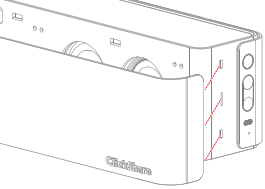
8.3 Front cover replacement

About cover replacement

Only the front cover can be replaced if it has been damaged. It is not recommended to frequently detach the front cover nor operate the Base Unit without a front cover attached.

Contact Barco to get a new front cover if a replacement is deemed necessary.

How to replace the cover
  1. Disconnect or detach the Base Unit for easy access. (optional)
  2. Detach the front cover.

    Note: Use caution to avoid damaging the camera lens and speakers!
    1. Place the Base Unit on its backside or upside down.

      Note: Do not place the Base Unit on its front, as this might damage the camera!
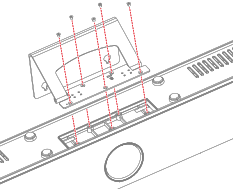
    2. Unscrew the five Phillips screws that hold the wall mount to the Base Unit.

      Image 8–2 Location of the five screws to unscrew
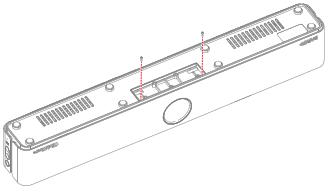
    3. Unscrew the two Philips screws that hold the front cover to the Base Unit.

      Image 8–3 Location of the two front cover screws to unscrew
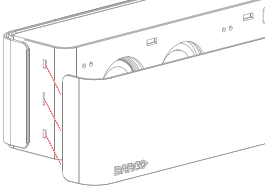
    4. Pull the sides away from the Base Unit until the fixations are no longer clicked into the Base Unit.

      Image 8–4 Pull direction for the side fixations
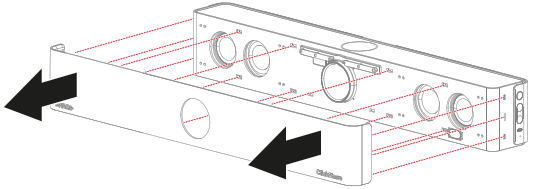
    5. Pull the front cover away from the Base Unit until none of the fixations are clicked into the Base Unit anymore.

      Image 8–5 Location of all fixations and direction to pull the front cover
  3. Attach the replacement front cover.

    1. Click the right or left side of the front cover in the fixation holes of the Base Unit.

      Image 8–6 Left fixation points
      Image 8–7 Right fixation points
    2. Continue clicking in each fixation sequentially until all fixations are clicked in place.

      Image 8–8 Attach direction if started from the left
      Image 8–9 Attach direction if started from the right
    3. Screw the two Philips screws to secure the front cover.

      Image 8–10 Location of the two front cover screws to tighten
    4. Screw five Phillips screws to secure the wall mount.

      Image 8–11 Location of the five screws to tigthen
  4. Reconnect, reattach and reposition the Base Unit in its desired location. (optional)