通过 USB-C 连接的 DisplayPort 连接
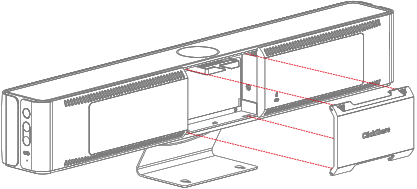
拆下 Base Unit 背面的电缆盖。
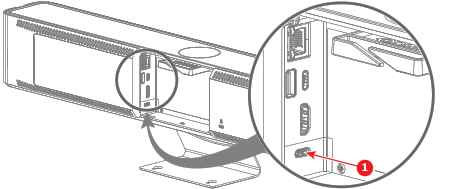
图像 5–17 将“DisplayPort”电缆使用“USB-C 转 DisplayPort”适配器从计算机的“DisplayPort 输出”端口连接到 Base Unit 的“USB-C”端口(参考 1)。
图像 5–18 - 在 ClickShare 配置程序中管理视频输入。有关更多信息,请参见“输入”。


拆下 Base Unit 背面的电缆盖。
将“DisplayPort”电缆使用“USB-C 转 DisplayPort”适配器从计算机的“DisplayPort 输出”端口连接到 Base Unit 的“USB-C”端口(参考 1)。