5.2.4.3 Log files

Location

System > Diagnostics > Log File

About logs

Logs only contain system information.

Required parts

8GB+ USB stick formatted in FAT32.

How to save
  1. Insert a USB stick in the desired port:
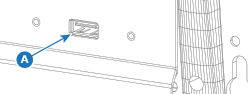
    • ‘USB-A’ port (reference A) at the front.
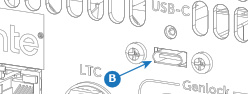
    • ‘USB-C’ port (reference B) at the back.
    Image 5–15
    Image 5–16
  2. Must stills be included in the logs?

    Note: Including stills will increase the size of the file.
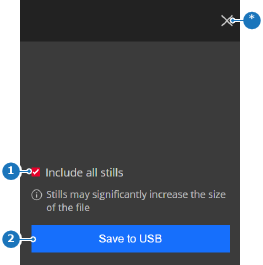
    • If yes, check the check box in front of Include all stills (reference 1).
    • If no, uncheck the check box in front of Include all stills (reference 1).
    Image 5–17
    1
    Still inclusion check box
    2
    Save button
    *
    Close button
  3. Tap on Save to USB (reference 2, Image 5–17) to store a copy of the log files.

    The log files are stored under the folder ‘EM\logs’ with the extension .tar.gz.

  4. Remove the USB stick.