Availability
- Models: EC-210
- Count: 4

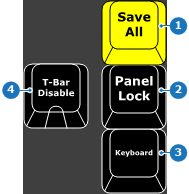
The button commits all modifications from memory to the hardware.
The button stops the touch screens from registering any presses. If presses on the touch screen must be registered again, click the button again.
The button toggles the virtual keyboard setting within Event Master Toolset. When enabled, a virtual keyboard is shown on the screen when an input field is selected. This setting is also available in Event Master Toolset. For more information, see “User preferences”.
The button stops the controller from registering changes with the T-bar handle. While the LED of the button is on, the controller will ignore T-bar handle changes.