8.20.1.3 Reset Event Master Toolset

Location
  1. Navigation side bar: Settings
  2. Left panel: Options
About EC-210 Event Master Toolset

The Event Master Toolset client running on the EC-210 also affects the configuration of the IP address. For this reason, a reset that keeps the IP address configuration of the EC-210 is added.

How to reset
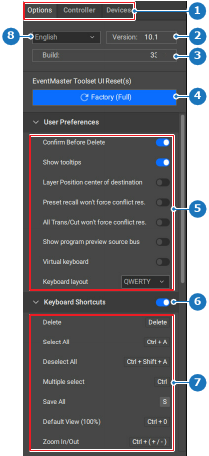
  1. Click Factory (Full) (reference 4).

    Tip: For EC-210 it is recommended to select Factory (Save IP) (reference 4).
    Image 8–189
    1
    Category selection
    2
    Event Master Toolset version number
    3
    Event Master Toolset build number
    4
    Factory reset button
    5
    User preference settings
    6
    Keyboard shortcuts toggle
    7
    Keyboard shortcut list
    8
    Language drop down

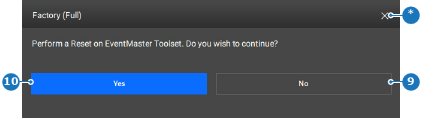
    A confirmation pop-up is shown.

  2. Click Yes (reference 10) to reset.

    Image 8–190
    9
    Cancel button
    10
    Confirmation button
    *
    Close button

    All Event Master Toolset configuration changes are reset to their factory default option.