
6.6.2 System info
About system info
General information about the units in the system along with the names of the system is found in this section.
How to rename
Enter the desired name one or multiple of the available input fields.
- For the system, enter the desired name in the input field after (reference 2).
- For one or more unit, enter the desired name in the input field after (reference 3).

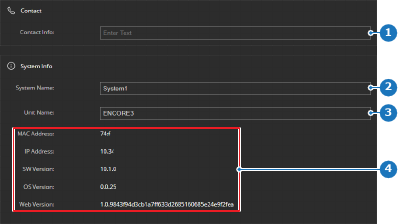
Image 6–30 - 1
- Contact info input field
- 2
- System name input field
- 3
- Unit name input field
- 4
- Unit information