5.4.4 Export stills

Location

ShowFile Management > Export All Still Images

Required parts

8GB+ USB stick formatted in FAT32.

How to export
  1. Insert the USB stick in the desired port:
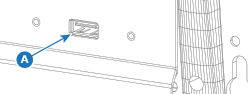
    • ‘USB-A’ port (reference A) at the front.
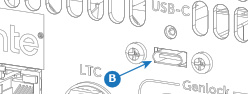
    • ‘USB-C’ port (reference B) at the back.
    Image 5–32
    Image 5–33
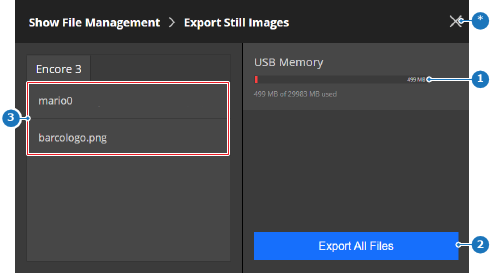
  2. Tap on Export All Files (reference 2) to store all stills on the USB stick.

    Tip: Ensure enough free memory is available (reference 1) to store the backup.
    Image 5–34
    1
    Available memory indicator
    2
    Export button
    3
    Detected still list
    *
    Close button

    Exporting may take several minutes, depending on the amount and size of the stills. The stills are stored under the folder ‘EM\stills\export’.

  3. Remove the USB stick.