Availability
- Models: EC-210

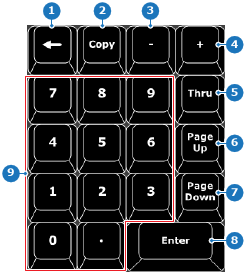
When an input field is selected in Event Master Toolset, then the buttons presses on the controller numpad behave the same as an external numpad. In other situations, the numpad is used to enter IDs, interact with the entered command or adjust the contextual display buttons.
The backspace key removes the last button press of syntax-based programming. For more information on how to see the syntax-based programming key presses, see “Using the controller”.
When a category is active, syntax-based programming expects the ID or range of IDs that are applicable in the category. Single IDs can be entered using the numbers and the decimal keys. Range can be entered using the numbers and decimal keys in combination with:
Contextual display buttons can have more than one page of settings to display. The ‘Page Up’ and ‘Page Down’ buttons of the numpad change which settings are being shown. For more information, see “Contextual display section”.