
5.3 Test pattern
About test pattern
Test pattern shows a static image that is useful for testing outputs, resolution of outputs and image quality. Some patterns can also be used to calibrate certain devices or ensure uniformity of the image across devices.
How to manage
Must the test pattern be shown?
- If yes and the outputs must be selected, tap the drop down after (reference 2). Go to next step.
- If yes and the selected outputs must be used, go to step 3.
- If no, tap (reference 1). No further actions required.
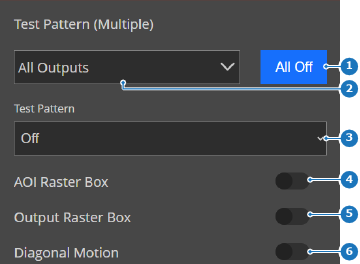
Image 5–19 - 1
- Pattern off button
- 2
- Output selection menu
- 3
- Test pattern drop down
- 4
- Area of interest toggle button
- 5
- Output raster toggle button
- 6
- Diagonal motion toggle button
Select or deselect the desired outputs from the destination list (reference 8) in the pop-up.

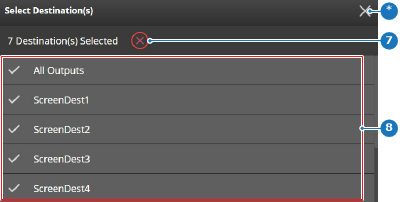
Image 5–20 - 7
- Deselect destination button
- 8
- Destination list
- *
- Close button
Select a desired test pattern from the drop down menu after (reference 3, Image 5–19).

- Add additional effects on top of the test pattern by toggling the slider after the desired effect (reference 4 through 6, Image 5–19). (optional)