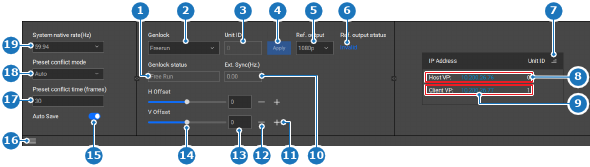
LocationNavigation side bar: ConfigurationCentral work window: Detail View or System View or Link Resources
About auto saveAuto save automatically commits any changes to memory after one minute of the system being idle.
How to setIs the bottom panel hidden?If yes, click the burger menu (). Go to next step.If no, go to next step.Must auto save be used?If yes, enable the toggle button after Auto Save (reference 15).If no, disable the toggle button after Auto Save (reference 15).Image 8–31 1Current Genlock mode label2Genlock mode drop down3ID of the genlock enabled unit4Apply genlock settings button5Genlock reference output drop down6Current status of the genlock reference output7Unit ID sorting button8Host unit details9Client unit details10External genlock sync status label11Increase offset button12Decrease offset button13Offset input field14Offset slider15Auto save toggle16Show or hide the bottom panel17Preset conflict frames input field18Preset conflict mode drop down19System native rate drop down

 ). Go to next step.