8.14.1 Configuring a tally

Location
  1. Navigation side bar: Tally
  2. Right panel: Tally
About tally

Up to 64 tally lights can be automatically managed through Event Master Toolset. These tally lights must be connected to a single network connected hub.

How to configure
  1. Select the desired command protocol from the drop down after Tally IP Protocol (reference 2).

    Tip: Selecting OFF will disable the tally protocol.
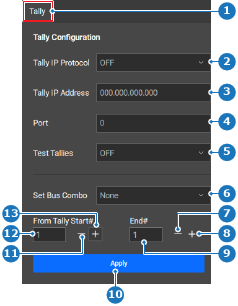
    Image 8–150
    1
    Category selection
    2
    Tally protocol drop down
    3
    Tally hub IP address input field
    4
    Tally hub port input field
    5
    Test tally drop down
    6
    Bus combo drop down
    7
    Decrease end tally number
    8
    Increase end tally number
    9
    End tally number input field
    10
    Apply button
    11
    Decrease tally start number
    12
    Tally start number input field
    13
    Increase start tally number
  2. Enter the IP address of the tally hub in the input field after Tally IP Address (reference 3, Image 8–150).
  3. Enter the desired port number after Port (reference 4, Image 8–150).
  4. Click the save icon () in the header.