8.20.1.5 Keyboard shortcuts

Location
  1. Navigation side bar: Settings
  2. Left panel: Options
About keyboard shortcuts

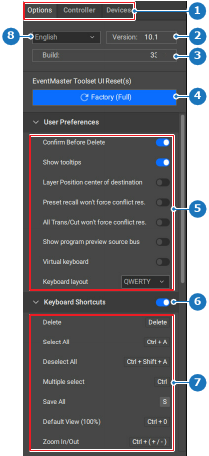
Event Master Toolset has shortcuts that can be used to simplify certain actions. If shortcuts are enabled, then all shortcuts mentioned in the list will execute once their assigned button is pressed on a keyboard. These shortcut buttons cannot be remapped.

How to toggle
  1. Must keyboard shortcuts be used?

    • If yes, enable the toggle button after Keyboard Shortcuts (reference 6).
    • If no, disable the toggle button after Keyboard Shortcuts (reference 6).
    Image 8–192
    1
    Category selection
    2
    Event Master Toolset version number
    3
    Event Master Toolset build number
    4
    Factory reset button
    5
    User preference settings
    6
    Keyboard shortcuts toggle
    7
    Keyboard shortcut list
    8
    Language drop down