Location
- Navigation side bar:
- Central work window:

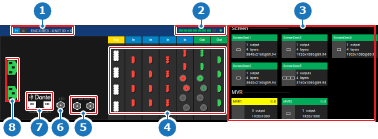
Event Master Toolset keeps track of how many screen destination resources are available per unit. Each possible screen destination is a section within the screen resource indicator (reference 2). Sections colored in green are in use and clear sections are available screen resources. No additional screen destinations can be added if the meter is full. Remove or edit some screen destinations to free up resources. For more information about resources, see “Resources”.