8.10.6.5 Unit information

Location
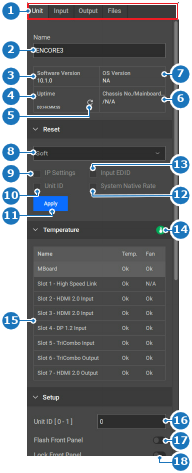
  1. Navigation side bar: Configuration
  2. Central work window: Detail View or System View
  3. Right panel: Adjust unit
About unit information

Unit information shows details about the unit selected in the central work area. Changing the selection to another unit will update the information in the right panel.

How to rename
  1. Is there more than one unit in the system?
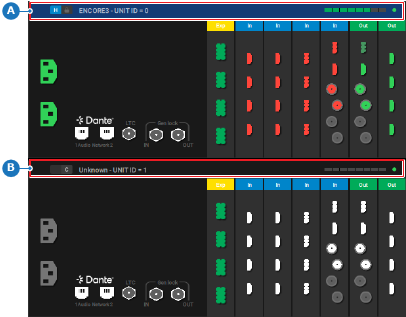
    • If yes, click on the header of the desired unit (reference A or B) in the central work window. Go to next step.
    • If no, go to next step.
    Image 8–33 Example where the host unit is selected
    A
    Host unit selection area
    B
    Client unit selection area
  2. Enter a desired name in the input field after Name (reference 2).

    Tip: Provide clear names that reflect the intended purpose.
    Image 8–34
    1
    Category selection
    2
    Unit name input field
    3
    Running software version
    4
    Last loaded uptime of the unit
    5
    Refresh the unit uptime
    6
    Unit serial number
    7
    Operating system version
    8
    Reset type drop down
    9
    Keep IP settings toggle
    10
    Keep Unit ID toggle
    11
    Start reset button
    12
    Keep system native rate toggle
    13
    Keep input EDID toggle
    14
    Unit health icon
    15
    Temperature diagnostics table
    16
    Unit ID input field
    17
    Flash unit front panel toggle
    18
    Lock unit front panel toggle
  3. Click the save icon () in the header.