8.15.4 Button LCD color

About color

Each button dedicated display uses background color to convey its current functionality. It is possible to put this color as the font color with a black background as opposed to the default colored background with a black font color. For more information about color, see “Color”.

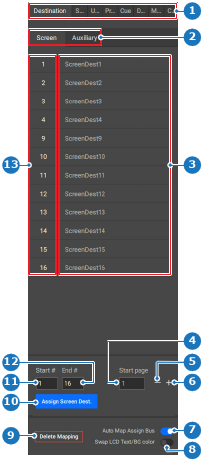
This setting can be toggled by clicking the Swap LCD Text/BG color slider in the left panel.

  1. Must the background color and text color be swapped?

    • If yes, enable the toggle button after Swap LCD Text/BG color (reference 8).
    • If no, disable the toggle button after Swap LCD Text/BG color (reference 8).
    Image 8–160
    1
    Category selection
    2
    Folder or subcategory selection
    3
    Options list
    4
    Start page number input field
    5
    Decrease start page number
    6
    Increase start page number
    7
    Auto map assign bus toggle button
    8
    Swap text color and background color toggle button
    9
    Delete mapping button
    10
    Assign button
    11
    Start number input field
    12
    End number input field
    13
    Options number list

    The LCD on the controllers update the colors.