8.16.1 Backup

Location
  1. Navigation side bar: ShowFile
  2. Top panel: Backup
About backup

Backup creates a ShowFile of the current active show and device configuration. This sharable ShowFile file can be fully or partially restored to any compatible Event Master device.

Note: Usage of the USB stick is only supported in Event Master Toolset for the EC-210.
Required parts

8GB+ USB stick formatted in FAT32.

How to create
  1. Is the backup feature being accessed from an EC-210?
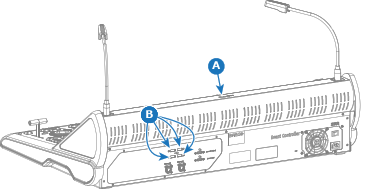
    • If yes, connect the USB stick to any free ‘USB-A’ port at the top (reference A) or at the back (reference B). Go to next step.
    • If no, go to next step.
    Image 8–162
  2. Must the stills be included in the ShowFile?
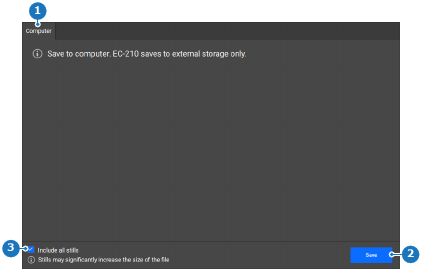
    • If yes, check the check box in front of Include all stills (reference 3).
    • If no, uncheck the check box in front of Include all stills (reference 3).
    Image 8–163
    1
    Computer tab
    2
    Backup button
    3
    Still inclusion check box
  3. Click on Save (reference 2, Image 8–163) to create the ShowFile.

    A pop-up window is shown.

  4. Store the ShowFile in the desired folder using the pop-up.

    The ShowFile is saved with the extension .tar.gz.

  5. Remove the USB stick.