5.6.2 Factory reset and keep

Location

Reset > Factory Reset and Keep

About factory reset and keep

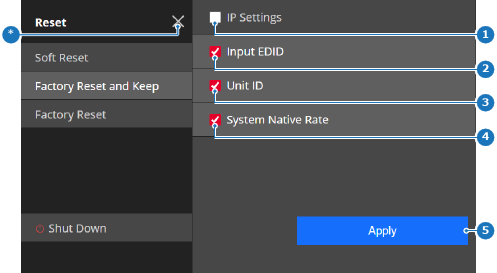
Restores settings to their default values, except for the checked configuration related settings.

How to reset
  1. Must some settings be kept?

    • If yes, check the check box (reference 1 through 4) in front of the desired setting.
    • If no, Uncheck the check box (reference 1 through 4) in front of the desired setting.
    Image 5–38
    1
    IP setting toggle button
    2
    Input EDID toggle button
    3
    Unit ID toggle button
    4
    Native rate toggle button
    5
    Apply button
    *
    Close button
  2. Tap Apply (reference 5, Image 5–38).

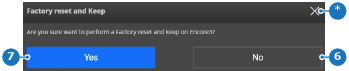
    A confirmation pop-up is shown.

  3. Tap Yes (reference 7) to reset.

    Image 5–39
    6
    Cancel button
    7
    Confirm button
    *
    Close button

    All settings, except for the checked settings, are reset to their factory default state and the Encore3 restarts.