6.4.3 Backup (USB)

Location

Tools > Backup

About backup

Backup creates a ShowFile of the current active show and device configuration. This sharable ShowFile file can be fully or partially restored to any compatible Event Master device.

Required parts

8GB+ USB stick formatted in FAT32.

How to create
  1. Insert the USB stick in the desired port:
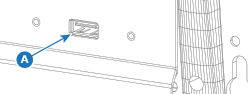
    • ‘USB-A’ port (reference A) at the front.
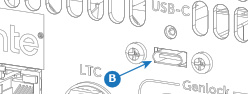
    • ‘USB-C’ port (reference B) at the back.
    Image 6–10
    Image 6–11
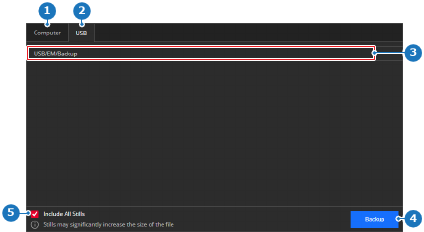
  2. Select USB (reference 2) in the main window.

    Image 6–12
    1
    Computer tab
    2
    USB tab
    3
    Detected backup folder list
    4
    Backup button
    5
    Still inclusion check box
  3. Must the stills be included in the ShowFile?

    • If yes, check the check box in front of Include all stills (reference 5, Image 6–12).
    • If no, uncheck the check box in front of Include all stills (reference 5, Image 6–12).
  4. Click on Backup (reference 4, Image 6–12) to create the ShowFile.

    The ShowFile is stored under the folder ‘EM\backup\sys’ with the extension .tar.gz.

  5. Remove the USB stick.