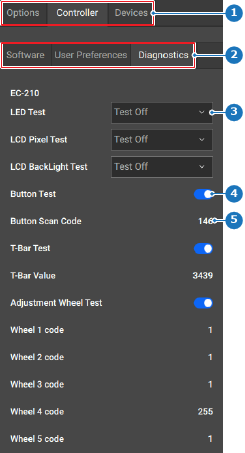
How to testSelect the name of the test from the drop down (reference 3) or enable the desired test (reference 4) in the left panel.Image 8–195 1Category selection2Subcategory selection3Test drop down4Test toggle5Test result labelThe test continuously runs while the option is selected or enabled.Select Off from the drop down (reference 3, Image 8–195) or disable the desired test after the name in the test list (reference 4, Image 8–195).