Loosen the eight screws (reference 2 Image 9–1) on the front side of the dust filter assembly (reference 1).
Remove the dirty dust filter assembly (reference 1) from the front cover of the projector.
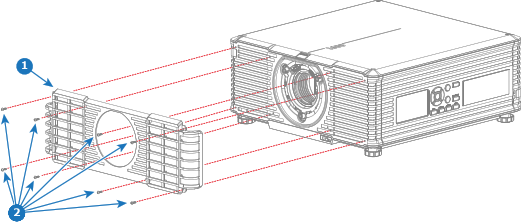
Image 9–1
Position the new or cleaned dust filter assembly (foam + holder) on the front cover of the projector.
Caution: Do not install a wet dust filter foam back into the projector under any circumstance. A wet filter foam can have serious safety consequences as well as jeopardize the internal optics of the system.
Fasten the dust filter assembly with 8 screws (reference 2 Image 9–1). Use a Torx screwdriver T10.
Caution: Do not install/use a damaged dust filter. Replace damaged a dust filter immediately with a new dust filter of the same type. See https://my.barco.com for the correct replacement part.