Wake-On-LAN (WOL)
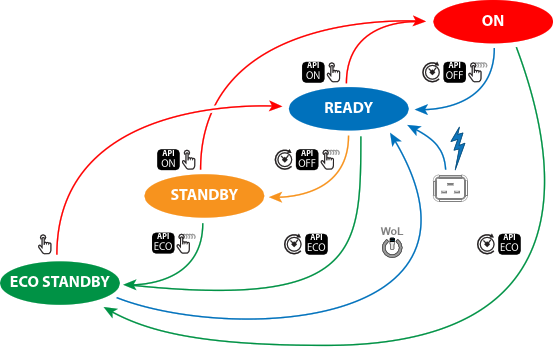
Wake-On-LAN (WOL), the standard ethernet network command, can be used to awakened or to turn on the projector by network message.
Used alone, the WOL command allows to switch in READY mode. A JSON command must be performed in addition to make the projector turn in to ON mode:
- Send WOL.
- Wait for connection to façade/prospector (the unit does provide feedback when it’s ready).
- Wait for ready state.
- Sleep 5 seconds.
- Send JSON “power on” command (to switch in ON mode).

Note: Wake-On-LAN (WOL) The link speed of the projector network interface in ECO mode is reduced to 10Mbit/s. This is standard practice in the industry to not waste power. Hence, the network connected with the projector must support such a low link speed to enable the remote wake up of the projector. This implies that all peripherals (switchers, routers...) in the network path must support WOL and configured correctly to support WOL.