
Projector status indicator LEDs
The Control & Communication module contains four status LEDs at the right side of the front panel. These LEDs allows a quick status analyses of the projector. For explanatory see table hereunder.
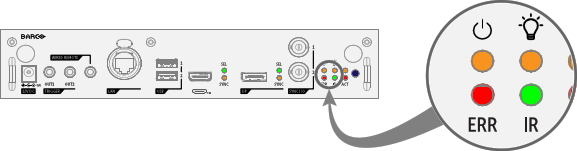
| LED | Color status | Description |
Power | Off | Projector is in ECO STANDBY mode, or is powering up |
| RED | Projector is in STANDBY mode | |
| ORANGE | Projector is in READY mode | |
| GREEN | Projector is ON | |
Illumination | Off | Light source is OFF |
| RED | No light source detected | |
| ORANGE | Light source is on in ECO mode | |
| GREEN | Light source is on in normal mode | |
| GREEN-ORANGE | Light source is on in CLO mode | |
| ERR | Off | No error |
| RED toggles on/off | Error | |
| ORANGE toggles on/off | Warning | |
| IR | RED | IR signal received |
| GREEN | IR signal acknowledged |

