Location and availability
- Menu: > > >
- Access level: all
- Models: all
- Requirements: Pulse 2.10 or later, USB flash drive plugged in

There is a private service user available with variable credentials, intended for service activities that can only be performed by authorized staff:
The service password is only available to people who have followed the service partner training for the appropriate projector and are registered as an official service partner with Barco.
There are two ways to obtain a service user password:
Send a request for a Service Partner password to the appropriate contact, including the . The contact will generate and share the password. The contacts are as follows
Log in on the Password reset website as service partner, and generate the password using the .
The password reset tool is available on the following location: passwordreset.proj.barco.com.

Each password is uniquely linked to the projector and is valid for up to ten days.
In the USB menu, select Service challenge and confirm.
The Service challenge menu is displayed.
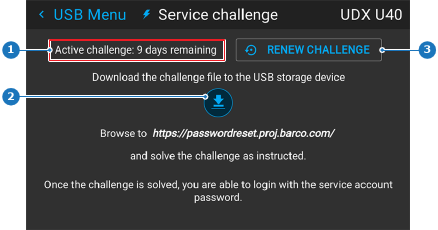
Select the download icon and confirm to download the to the USB flash drive (as .json file).
Wait until the menu shows “” before removing the flash device.
Do one of the following:
Contact Barco support and provide the Service user challenge key.
Barco support will provide you with a service password.
Browse to the following UR and upload the challenge key file: https://passwordreset.proj.barco.com

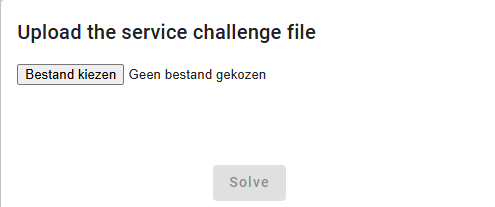
After pressing solve, a service password will be generated.
Go to the Login menu and log in with the following credentials: