5.1.9 Stop sharing

Availability
About stop sharing

There are two main methods to stop ClickShare from sharing:

Prerequisites

Content must be shared before sharing can be stopped. For more information, see:

How to stop
  1. Stop the sharing using one of the following methods:

    • Using the Button, press the share button.
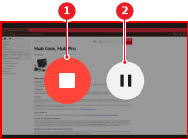
    • Using the Desktop App or Button App, click the stop button (reference 1) of the content that is being shared.
    • Using the shared window, close the window.
    Note: For more information on the location of the share button, see “The ClickShare Button”.
    Image 5–12
    1
    Stop sharing
    2
    Pause sharing

    The ClickShare wallpaper is shown.


[3] Only when using a 5th gen Button