About disconnecting
Disconnecting breaks the link between the user device and the ClickShare. Signaling to the ClickShare that the meeting is finished.

Disconnecting breaks the link between the user device and the ClickShare. Signaling to the ClickShare that the meeting is finished.
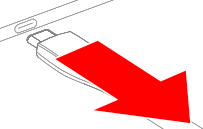
Unplug the Button from the user device, as illustrated.

Any shared content disappears from the meeting room displays. The ClickShare wallpaper is shown.
Store the Button in a Button tray or dedicated location.