4th gen Button overview
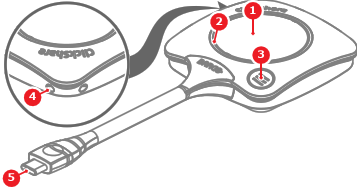
- 1
- Share button
- 2
- LED ring
- 3
- ClickShare App button with LED
- 4
- Strap holes
- 5
- USB-C™ connector


There are two physical buttons on the Button. For more information, see the following table:
| Action | Function |
| Short press on share button | Starts sharing |
| Long press on share button | Takes over sharing |
| Press the menu button | Brings up or hides the ClickShare App |
There is an LED ring around the share button. The color and animation of the LED shows the current state of the Button. For more information on the possible states, see the following table:
| LED | Meaning |
| White fill | Setting up the connection |
| Steady white | Connected and ready to be used |
| Blinking white | Unable to connect ClickShare App not running |
| Fast white spinning | Button busy Button processing |
| Purple | Conference view without sharing |
| Purple - red spinning | Conference view with sharing |
| Steady red | Sharing |
| Blinking red | Error |