Quitting the Desktop App
The Desktop App makes use of background processes that are not visible to regular users. Closing the Desktop App does not stop these processes. To stop these processes, the Desktop App must be quit.

The Desktop App makes use of background processes that are not visible to regular users. Closing the Desktop App does not stop these processes. To stop these processes, the Desktop App must be quit.
The Button App can be quit while a Button is connected. Without the Button App the Button is only capable of screen sharing. Any other ClickShare features are not available until the Button App is manually restarted or the Button is reconnected.

Click (reference 5).
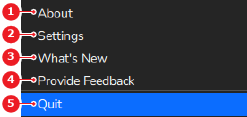
The ClickShare App and all background processes are closed.