3.3.2 Beta program

About beta program

Any user with a myBarco account can sign up for the beta program at any time. The beta program provides early access to experimental ClickShare features. Active tests are communicated through the myBarco account used during the sign up. These tests can make the Desktop App behave unexpectedly. Leaving the beta program can be done at any time.

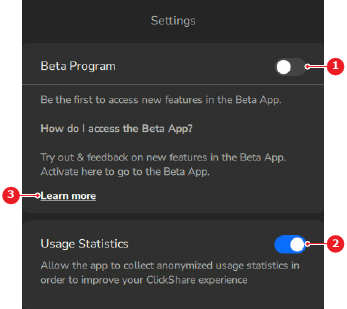
Location

Options () > Settings

Prerequisites

Usage statistics must be turned on to join the beta program. For more information, see “Usage statistics”.

How to toggle
  1. Must the beta program be joined?

    • If yes, enable the slider after Beta Program (reference 1).
    • If no, disable the slider after Beta Program (reference 1).
    Image 3–7
    1
    Registration toggle
    2
    Usage statistics toggle
    3
    More information link

    A pop-up is shown.

  2. Log in to the desired myBarco account in the pop-up window.

    • In case of sign up, log into the desired myBarco account in the pop-up window. Go to next step.
    • In case of leaving, wait until the a confirmation notice is shown in the pop-up. No further actions required.
  3. Read and agree to the terms of the beta program.

    Any tests of experimental features are activated and a confirmation email is sent.