
9.5 Stop room sharing
About stop room sharing
There are two main methods to stop ClickShare from sharing to the room and in the meeting:
- Stop sharing, the user device remains connected to the ClickShare and new content can be shared immediately. For more information, see the following procedure.
- Disconnecting, the connection between the user device and ClickShare is closed. For more information, see “Ending the ClickShare meeting”
How to stop
Stop the sharing using one of the following methods:
- Using the Button, press the share button.
- Using the Desktop App or Button App, click the stop button (reference 1) of the content that is being shared.
- Using the shared window, close the window. (only for CX-50 Gen2)

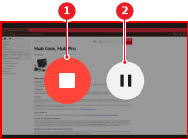
Image 9–3 - 1
- Stop sharing
- 2
- Pause sharing
The room system home page is shown.