About the Base Unit
The Hub Core, Hub Pro is the Base Unit of a ClickShare installation. It is responsible for enabling the ClickShare functionalities and managing or controlling the connected devices.


The Hub Core, Hub Pro is the Base Unit of a ClickShare installation. It is responsible for enabling the ClickShare functionalities and managing or controlling the connected devices.
The Base Unit and peripherals are regionalized. An up to date list of the certified countries and applicable peripherals can be found on the product support page. For more information, see https://www.barco.com/en/support.
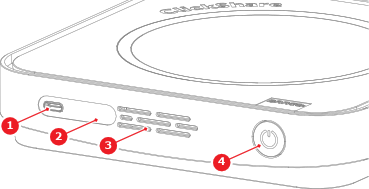
Front view:
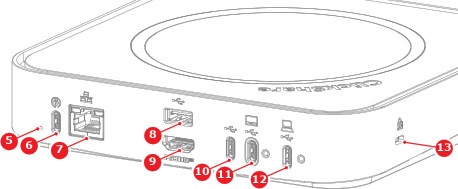
Hub Core back view:
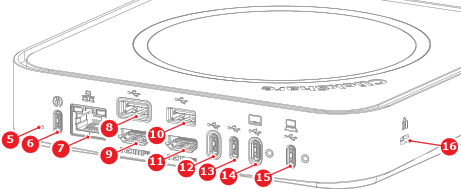
Hub Pro back view:
There is an LED ring behind the power button of the Base Unit. The color and animation of the LED ring shows the current state of the Base Unit and connected peripherals. For more information on the possible states, see the following table:
| LED status | Meaning |
| Steady white | Base Unit powered on |
| Blinking white | Base Unit starting Updating software |
| Breathing white | ECO mode active |
| Steady red | Sharing |
| Blinking red | Button pairing failed Software update failed |