7.10.3 Microsoft Teams settings

Location & availability
About Microsoft Teams settings

A Microsoft Teams account is required to use the ClickShare system in a Microsoft Teams room. Settings and options related to the Microsoft Teams account can be found in this section of the user interface.

How to view
  1. Is the correct Microsoft Teams account used?
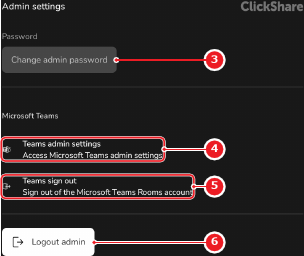
    • If yes, tap the settings link (reference 4) to manage the Microsoft Teams account. For more information, see the documentation of Microsoft Teams.
    • If no, tap the logout button (reference 5) to change Microsoft Teams accounts. Go to next step.
    Image 7–43
    1
    Admin name input field
    2
    Save button
    3
    Change password menu
    4
    Microsoft Teams settings link
    5
    Microsoft Teams logout button
    6
    Admin logout button
  2. Follow the instruction to link the ClickShare to another Microsoft Teams account. For more information, see the documentation of Microsoft Teams.

    The home screen of the room system is shown.