Location & availability
- Menu: > > > >
- Access level: admin

By default, the calendar and the internal clock of the ClickShare system are based on the selected time zone. It is possible to overwrite the time zone clock with a time server of choice or a manual time. For more information, see the following procedure.
Must a time server be used?
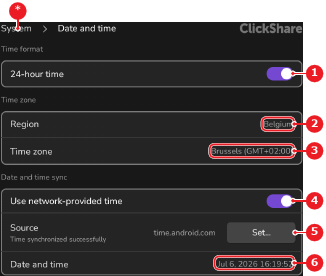
Tap (reference 5, Image 7–29) to change the time server.
A pop-up is shown.
Enter the desired time server IP address or domain name in the input field (reference 7).

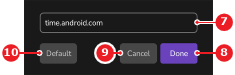
Tap (reference 8, Image 7–30). No further actions required.
The date and time is synced to the selected server. This can take a few minutes, depending on the network speed.
Tap the date label after (reference 6, Image 7–29).
A calendar and a time wheel are displayed.
Tap on the desired date from the calendar (reference 14).
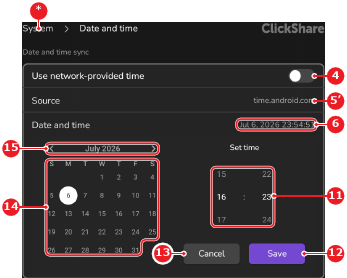
The selected date has a white circle as background.
Tap (reference 12, Image 7–31).
The selected date and time are applied and shown after (reference 6, Image 7–31).
 and
and  icons or by swiping left or right on the calendar.