About factory reset
Factory reset will return all settings to their default option. Any modifications to the name, IP address or other configurations will be lost indefinitely. The Base Unit will require a full configuration as if it was a new unit.

Factory reset will return all settings to their default option. Any modifications to the name, IP address or other configurations will be lost indefinitely. The Base Unit will require a full configuration as if it was a new unit.
Small paperclip with a diameter of 1.5 mm or less
Press and hold the reset button (reference 1). Use a small paperclip.

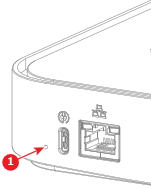
Release the reset button after 30 seconds.
The Base Unit will restart.